Blogger has incorporated typing new posts in Kannada, Tamil, Telugu and Malayalam using transliteration, a facility which till now was only available to Hindi as far as Indian languages are considered. So now you don’t have to type your regional language posts using some third party applications like Baraha, Quillpad and then paste the content in Blogger post. You can now directly type in Kannada, Tamil, Telugu and Malayalam in Blogger keeping the transliteration button on and selecting the required language. Advantage here is that you can correct the typing mistakes, the moment English letters are changed to Indian language letters. One more change which would be of interest to all the bloggers (for providing backtrack links to their blogs) is while providing comments to any Blogger post, you now have the option of choosing your identity from LiveJournal, WordPress, TypePad and AIM. And if you own a domain you can also provide your URL in the comment form.
 For all the changes introduced by Blogger click the below link
Blogger Buzz
One more change which would be of interest to all the bloggers (for providing backtrack links to their blogs) is while providing comments to any Blogger post, you now have the option of choosing your identity from LiveJournal, WordPress, TypePad and AIM. And if you own a domain you can also provide your URL in the comment form.For all the changes introduced by Blogger click the below linkBlogger Buzz
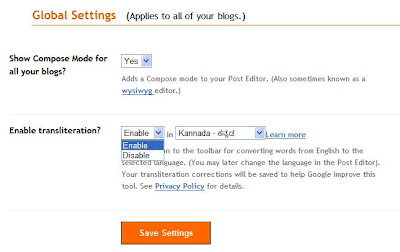
Updates : How to disable transliteration in blogger?
If you are not using tranliteration you can disable it using global settings. For this, go to Settings section in your blogger dashboard. Then in the lower half of this page you will find Global Settings. You can enable/disable transliteration facility as shown in the figure below.