Showing posts with label Life Hacks. Show all posts

Saturday, June 24, 2017

How to replace the BESCOM meter, which stopped working?

BESCOM meter of my house stopped showing no reading on display screen. It showed a blank screen. So, I had to replace it. Here are the detailed steps, I followed to get it replaced.

Note : If the BESCOM meter stopped working within 5 years of installation, then it will be replaced free of cost by BESCOM, as it comes under warranty. If not, one has to purchase a new one and install it.
  1. Visit to the Soujanya Counter : 
    • On enquiring in the Soujanya Counter in BESCOM office, I was asked to meet the JEE (Junior Engineer Electrical). He asked me to get the form for granting permission to purchase the BESCOM meter.
  2. Getting the Form for granting permission to purchase BESCOM meter :
    • Above is the form you should get.
    • The form would be available in Karnataka State Licensed Electrical Contractors Association office, which would generally be near to BESCOM office.
    • This form would be filled by the JEE indicating he has granted permission to procure the BESCOM meter.
  3. Get the above form filled and signed by JEE :
    • JEE will fill and sign the form and will tell where the meters are available. 
  4. Procure the meter :
    • In my case, local BESCOM office did not have stock of single phase meters. So, I had to go to AEE BESCOM office in Rajaji Nagar. It has the retail outlet for procuring electricity meters. Following is the address of the same : 
      • AEE BESCOM Office, 41st Cross Rd, Rajaji Nagar, Bengaluru, Karnataka 560010
    • Hand over the form filled by JEE and procure the meter. It would be good keep a photocopy of the letter, as the original letter will have to be submitted.
    • Get the purchase bill and check the carton box containing the meter has Test certificate issued by BESCOM and warranty certificate.
    • Cost of the single phase meter was Rs.740/-
  5. Register the meter in the BESCOM office :
    • Come back to local BESCOM office and get the meter registered by JEE.
    • JEE will ask a lineman to install the new meter and ask you to pay him Rs.100/-
  6. Get the meter installed by lineman :
    • Get the lineman to your location to install the new meter.
    • Old meter has to be handed over to the lineman.
Important Notes :
  • You don't have to pay any bribe to get your BESCOM meter replaced.
  • It takes a bit of patience and diligence to get the thing done. JEE may not be available in  his office all the time. So, you may have to wait and but do not loose patience!
  • Even if it is a Saturday, office will be open till 5 30 pm. 
  • Keep the original receipt of purchase of meter, as it would be required to claim warranty later.
  • Keep copy of grant letter and original test and warranty certificates with you.
  • Following were my expenses :
    • Cost of BESCOM single phase meter : Rs. 740/-
    • Installation fees for line man : Rs.100/- 
    • Fuel expenses : Rs.100/-
    • Time Spent : Around 6 hours

Saturday, July 23, 2016

How to get Official Transcripts from VTU through Bangalore Regional Office?

If you have completed Bachelor of Engineering(B.E) from Visvesvaraya Technological University(VTU), Belgaum, you would need official transcripts from the university, if you are applying for higher studies abroad or during immigration. This post explains the procedure to get VTU Official Transcripts through Bangalore Regional Office.

Saturday, July 16, 2016

Check list for buying property in Bangalore

Disclaimer : This post is intended to provide few tips, while looking for and buying property in Bengaluru/Bangalore. Information provided in this post is by no means complete. Please your discretion and contact your legal adviser, before taking any decision based on the information in this blog. Author will not compensate you in any way whatsoever, if you ever happen to suffer a loss/inconvenience/damage because of/while making use of information in this blog post.

Buying a property is an important decision in anyone's life. Due diligence is required, while making the big decision, which could have a massive impact on buyer's financial state. This post provides few tips while buying property in Bangalore. Hope this helps!

Saturday, February 27, 2016

How to change the name in BESCOM electricity bill?

Ok, you have completed the registration of your newly bought house/apartment in Bengaluru. What next? Changing the names in BESCOM electricity bill and BWSSB water bill must be your priority, which once done, would immediately serve as a address proof to your new residence. Explained here is the detailed procedure to change the name in BESCOM electricity bill or transfer of BESCOM electricity connection.

Sunday, February 07, 2016

What to do when a NEFT Transfer fails?

I think National Electronic Funds Transfer (NEFT) is one of the most commonly services used in Internet Banking in India. Started more than 10 years ago in 2005, NEFT has become an integral part our daily lives. Quick and reliable, it has slowly replaced payments through cheques as the transfer gets done within two hours nowadays.

Though rare, a NEFT transfer may fail due to some technical glitch. It may happen at the time of heavy load of payments during the last day of the month or so. Here’s what you need to do, in case your NEFT transfer fails i.e remitter account is debited but the beneficiary account is not credited with the amount!

Saturday, November 21, 2015

Why I cancelled my Airtel 4G connection?

It was two years ago in 2013, I bought Airtel 4G connection with wifi router. That was much before the pretty girl from Airtel challenged all other internet service providers in India claiming Airtel 4G is the fastest internet network in India.

Initial Postpaid Plan : My initial post paid plan was 4G LTE 2000 - 40 GB of 4G LTE data(after 40gb,100% free with lesser bandwidth). I used to get a bill of Rs.2000 + Taxes.

Enter CPE Lock Plan : In December 2014, Airtel quietly withdrew the above plan and replaced it with CPE Lock Plan 1999 30GB. In this plan, rental amount is 1999 and one would get 30GB data at 4G speed. Post completion of 30GB the data will be charged 0.2Ps/10KB till the limit of 3995. That is user would be paying Rs.1995 for 10 GB between 30 to 40 GB. So, according to this plan, if you happen to cross the data limit of 30 GB and reach 40 GB, you will be paying nearly double the rent. I smelt a rat but did not worry much as my usual usage was around 25 GB.

Wednesday, November 11, 2015

Indian Passport Renewal Procedure and Tips

You might have heard from your friends about the quick and easier renewal of passports these days in India. I got my passport renewed recently. What my friends told about the renewal process was right. But even then one needs to take care of few points during renewal. Here are those.

Passport Renewal Appointment : Online appointment is mandatory for renewal of passports. To schedule the appointment, you need to create an id for yourself at Indian Passport website. System will automatically book a slot for you. If you want to cancel/reschedule, you can do so. But this can be done only twice within a year of first appointment date.

Proofs : Once you have scheduled the appointment, it is time to gather proofs for submission. Though the passport website document adviser will give you a list of indicative proofs, they may not be complete. So, it is better you go through the list of documents listed in the online appointment receipt as per your case. Definitely, you do not want to make a trip to passport office in case some proof is missing. Some tips here.

Friday, March 02, 2012

Configuring DSL Modem for Airtel Broadband

Airtel Broadband DSL modem configuration is similar to BSNL one. If you already have a modem you can configure it with the following the settings. I had a BSNL DSL wireless router/modem, which I was able to configure successfully for Airtel Broadband connection.
1. Login to your modem/DSL router typing 192.168.1.1 on your browser with username : admin (default password would be password)
2. Go to WAN(Wide Area Network) Setup and click edit on the first entry in the table with settings Vpi/Vci as 1/32 with protocol PPPoE (If you are using BSNL modem, Vpi/Vci would be 0/35 - change that to 1/32)
Airtel Broadband WAN Setup

Sunday, February 12, 2012

How to check your PF balance online?

Steps to check your Provident Fund(PF) balance online.
  • Go to http://www.epfindia.com/MembBal.html
  • Click on the link - Click here to know the balance - at the end of the page.
  • In the next link, select the PF office state from the drop down menu
  • Once you select the state, select your EPFO office. This will take you to the next page.
  • This page 'Member Balance Information' has provision for the entry of your PF account number, your name (as it appears on EPF slip) and your mobile number
  • Instructions for entering the PF number :
    • Assume you Your PF Number is KN/XXXXX/YYYYY (i.e from Karnataka)
    • Then  in Employee PF Account Number field (which has 5 boxes with first 2 filled), enter XXXXX in the third box and leave the fourth box empty
    • In the 5th box enter YYYYY
    • Enter your name as it appears in your old PF slips
    • Enter your mobile number
    • Check the I Agree check box and click Submit button
    • After a while you get a SMS on your mobile mentioning your PF balance. There will be 2 parts in it - EE amount and ER amount - EE is the amount contributed by the Employee and ER is the amount contributed by the Employer.

Monday, July 06, 2009

How to change DNS Server Configuration in BSNL Broadband?

If you are using a BSNL broadband connection, you may have experienced problems in hostnames not resolving into IP Addresses. You thus, end up seeing page requested is not being loaded. Problem is with the default BSNL DNS servers, which are often unresponsive.

To resolve these DNS related issues, just change the DNS configuration in your BSNL modem/DSL router.
  1. Login to your BSNL modem/DSL router typing 192.168.1.1, which is BSNL DSL router IP, on your browser and username : admin.
  2. DSL router configuration window opens. Click on DNS in Advanced Setup menu on left hand side.You get DNS Server Configuration window. There are Primary and Secondary DNS Servers configured. Change these to Open DNS servers : Primary - 208.67.222.222 and Secondary - 208.67.220.220. To know more about open DNS visit - opendns.com3.Click on save and Reboot the modem/DSL router for the changes to take effect.
P.S: The procedure explained above for resolving DNS server related issue, is the one I followed to resolve it in UTStarcom ADSL 2+ Modem/Router, Model No : WA3002G4 got from BSNL.

Sunday, April 26, 2009

BSNL DSL Router Username Reset Problem

If you are using BSNL broadband connection then you may have experienced a peculiar problem of username in the modem settings getting reset to 'multiplay' for unknown reasons. Due to this, Internet LED in the BSNL modem keeps blinking and you are unable to access the net. This shows up as Authentication Failure in PPPoE protocol status. To see the status of PPPoE protocol status and resolve this issue,
  1. Login to your BSNL modem/DSL router typing 192.168.1.1, which is BSNL DSL router IP, on your browser and username : admin.
  2. DSL router configuration window opens. On the left hand side of the window, click on WAN in Device Info menu. Check the first row(VPI/VCI - 0/35, Protocol - PPPoE) of the WAN info table displayed. Below image shows the status in normal working scenario. If the username is reset, Status column in this row displays Authentication Failure.BSNL DSL Router WAN Info
  3. To resolve this error, click WAN in Advanced Setup menu. WAN Setup table appears. First row in this table displays settings for PPPoE(VPI/VCI - 0/35), click Edit at the end of this row.BSNL DSL Router WAN SetupClicking edit takes you to ATM PVC Configuration window, where you need to make sure that the value of VPI is 0 and of VCI is 35 and UBR Without PCR is selected as Service Category. Click Next button after the changes(if any).BSNL DSL Router ATM PVC Configuration
  4. After clicking next, Connection Type window appears. Make sure that PPP over Ethernet radio button is selected and LLC/SNAP-BRIDGING is selected as Encapsulation Mode. Click next.BSNL DSL Connection Type
  5. After clicking next, PPP Username and Password window is displayed. Enter your Username provided during installation of the BSNL broadband connection by BSNL guys and password. Enter PPPoE Service Name as dataone and select AUTO as Authentication Method. Check Bridge PPPoE Frames Between WAN and Local Ports(Default Method). Click next after that.BSNL DSL Router PPP Username and Password
  6. Network and Adress Translation Settings window appears. Make sure Enable NAT and Enable Firewall check boxes are ticked. In Enable IGMP Multicast and WAN Service, see that Enable WAN Service check box is ticked. Enter Service Name as pppoe_0_35_1. Click next.BSNL DSL Router Network Address Translation IGMP Multicast WAN Service Settings
  7. WAN Setup - Summary window appears which gives the summary of settings you just made. Click on save which opens a WAN Setup window(2nd image from top in this post), where in you need to click the Save/Reboot button for your changes to be reflected. Once the modem/DSL router comes up, you should be able to see Internet LED on that is stable and is not blinking. Now, you should be able to access the net.BSNL DSL Router WAN Setup Summary
Note: This problem was showing as Authentication Failure in WAN status previously. Recently, I observed even though WAN status showed PPPoE protocol status as Up, I was not able to access the internet. I found that username had been reset to multiplay and after changing the username, I was able to surf.

P.S: The procedure explained above to resolve BSNL DSL Router Username Reset problem, is the one I follow to resolve it in UTStarcom ADSL 2+ Modem/Router, Model No : WA3002G4 got from BSNL. I am not sure whether the same things apply to other DSL Router models provided by BSNL. Also, note that after change the username from 'Multiplay' to yours and reboot the modem, Wireless settings would have been reset, which need to be setup again.

Update 10/05/2009 : Fellow blogger Manoj has informed that the same problem occurs in UTSTARCOM UT300R2U modem(Type I), provided by BSNL.

Thanks
Raveesh

Wednesday, February 13, 2008

Type your posts in Kannada, Tamil, Telugu, Malayalam in Blogger now

Blogger has incorporated typing new posts in Kannada, Tamil, Telugu and Malayalam using transliteration, a facility which till now was only available to Hindi as far as Indian languages are considered. So now you don’t have to type your regional language posts using some third party applications like Baraha, Quillpad and then paste the content in Blogger post. You can now directly type in Kannada, Tamil, Telugu and Malayalam in Blogger keeping the transliteration button on and selecting the required language. Advantage here is that you can correct the typing mistakes, the moment English letters are changed to Indian language letters.One more change which would be of interest to all the bloggers (for providing backtrack links to their blogs) is while providing comments to any Blogger post, you now have the option of choosing your identity from LiveJournal, WordPress, TypePad and AIM. And if you own a domain you can also provide your URL in the comment form.For all the changes introduced by Blogger click the below link
Blogger Buzz


Updates : How to disable transliteration in blogger?

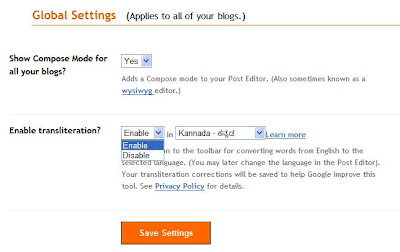
If you are not using tranliteration you can disable it using global settings. For this, go to Settings section in your blogger dashboard. Then in the lower half of this page you will find Global Settings. You can enable/disable transliteration facility as shown in the figure below.

LinkWithin

Related Posts with Thumbnails